
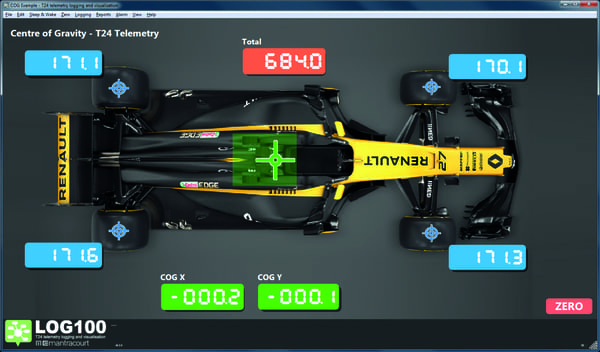
What is the Centre of Gravity (CoG) Software?
A Centre of Gravity (CoG) weighing system is a precision measurement system used to determine both the total weight of a structure or object and the location of its centre of gravity. It is commonly employed in applications such as aerospace, automotive, transport fixtures, machinery platforms, and structural testing where load balance and stability are critical.
The Centre of Gravity system is a feature within the LMS-LOG100 Load Cell Data Logging Software. It is designed to calculate and display the centre of gravity position of a load using live weight data.
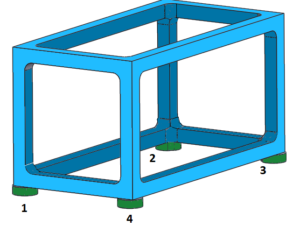
Visual example of load cell positioning underneath typical frame structure
System Configuration
The system typically consists of four highly-accurate Load Cells, one positioned at each corner of a rigid weighing structure or platform. Each load cell independently measures the vertical force applied at its location. The platform is designed to distribute the applied load directly into the load cells with minimal deflection or friction.
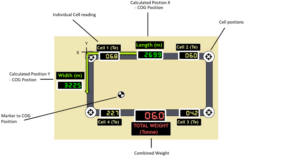
Example CoG & total weight reading
Key Advantages of CoG Analysis
- Accurate determination of weight and balance in a single measurement
- Real-time CoG calculation
- Scalable design for small assemblies or large structures
- Improves safety, stability, and compliance in load-critical applications
Typical Applications
- Aircraft and aerospace component weighing
- Vehicle and chassis balance measurement
- Industrial machinery and skid systems
- Structural test rigs and load platforms
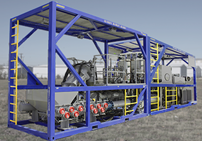
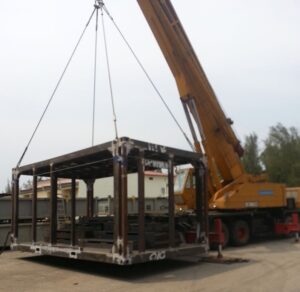
Examples of typical applications where CoG is not central
How the CoG Feature works
When a load cell is placed on the weighing structure:
- Load Measurement
Each Load Cell measures the portion of the total load acting at its corner. The sum of the four load cell outputs provides the total system weight.
- Load Distribution Analysis
Because the centre of gravity is rarely perfectly central, the load is not equally distributed. The variation in force measured by each load cell reflects the horizontal position of the centre of gravity.
- Centre of Gravity Calculation
Using the known geometry of the platform (load cell spacing in the X and Y axes), the system calculates the centre of gravity location by applying moment-balance equations. The CoG position is expressed as an offset from a defined reference point, typically the platform centre or a corner datum.
- Output & Interpretation
The system outputs:
- Total weight
- Centre of gravity position in X and Y coordinates
- Optional percentage load per corner or stability margins
The CoG position can be viewed on a laptop, tablet, phone or the LMS wireless handset, providing flexibility on-site.
How to Measure the CoG
Typical workflow:
- Ensure Base Station is plugged in to the computer/laptop
- Launch the CoG software
- Enter the X and Y coordinates for each source
- Place the load cells under the item you are weighing.
- Select the weight sources to be used in the calculation
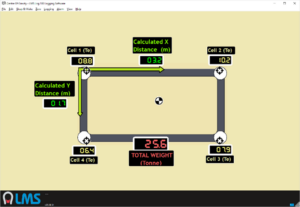
Example CoG reading displaying the CoG is off-centre
Preventing Misuse
CoG measurement software relies on correct load cell placement and input accuracy. Human error during set up can lead to equipment failure. Users should always refer to the user manual for setup, calibration and safety guidelines.
All load cells must display a reading of 0.00 prior to weighing. The user must ‘zero’ all the cells by clicking ‘Zero all’ within the CoG software.
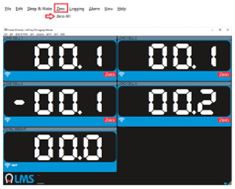
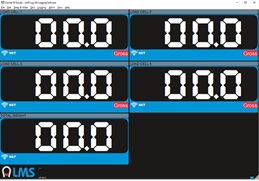
Setting load cells to 0.00 prior to applying weight
The LMS-LOG100 Centre of Gravity (CoG) feature offers a precise, real-time method for measuring both the total weight and the exact centre of gravity of a structure or object. By using up to four load cell inputs, the system calculates weight distribution and CoG position with high accuracy, helping to ensure stability, safety, and compliance in load-critical applications.
CoG data can be visualised on laptops, tablets, phones, or the LMS wireless handset, providing flexibility for on-site monitoring. The software is compatible with Windows 10, 8, 7, and Vista, and supports straightforward input of X and Y coordinates for each weight source. Users can also log and save readings for future reference, simplifying analysis and reporting.
Ideal for industries ranging from aerospace and automotive to industrial machinery and test rigs, the LMS-LOG100 CoG feature streamlines weight and balance analysis, reduces manual calculations, and enhances operational efficiency.